How to Create a Sales Funnel in HighLevel: The Complete Builder’s Guide

You’re building funnels in HighLevel, but conversion rates stall. Most builders use the drag-and-drop editor without understanding strategy.
A high-converting funnel isn’t about templates. It’s about setting up your sub-account, connecting your CRM, and creating automation that is effective. This guide will take you through the process of creating a converting sales funnel.
What is a Sales Funnel in HighLevel?
A funnel in HighLevel is a directed sequence of pages that guides prospects toward one action. A GHL funnel is different from a normal website because there are no distractions, just a landing page, lead form, thank you page, and automation triggers.
Most users end up failing because they begin designing before they have settled on their buyer journey, custom fields, and automation logic. Without this foundation, leads enter your CRM, but no workflow fires. That’s a configuration problem, not a design problem. Fix strategy first, then pages.
How to Create a Sales Funnel in HighLevel: 8 Complete Steps
To build a funnel that actually converts, you need to sequence things right. Do it wrong and you’ll waste hours debugging later.
Step 1: Define Your Funnel Goal and Buyer Journey
Sketch out your buyer journey on paper before you open the editor.
What’s your end goal? Email list? Appointments? Product sales? Each one needs a different page structure. Map it: Where do they come from → how they enter your funnel → how you build trust → your offer → what happens after they buy. Write it down. Lock it in. Then build.
This step alone prevents 80% of GHL funnel mistakes.
Explore high-converting GoHighLevel templates in our funnel template shop.
Step 2: Create Your Sub-Account Funnel Structure
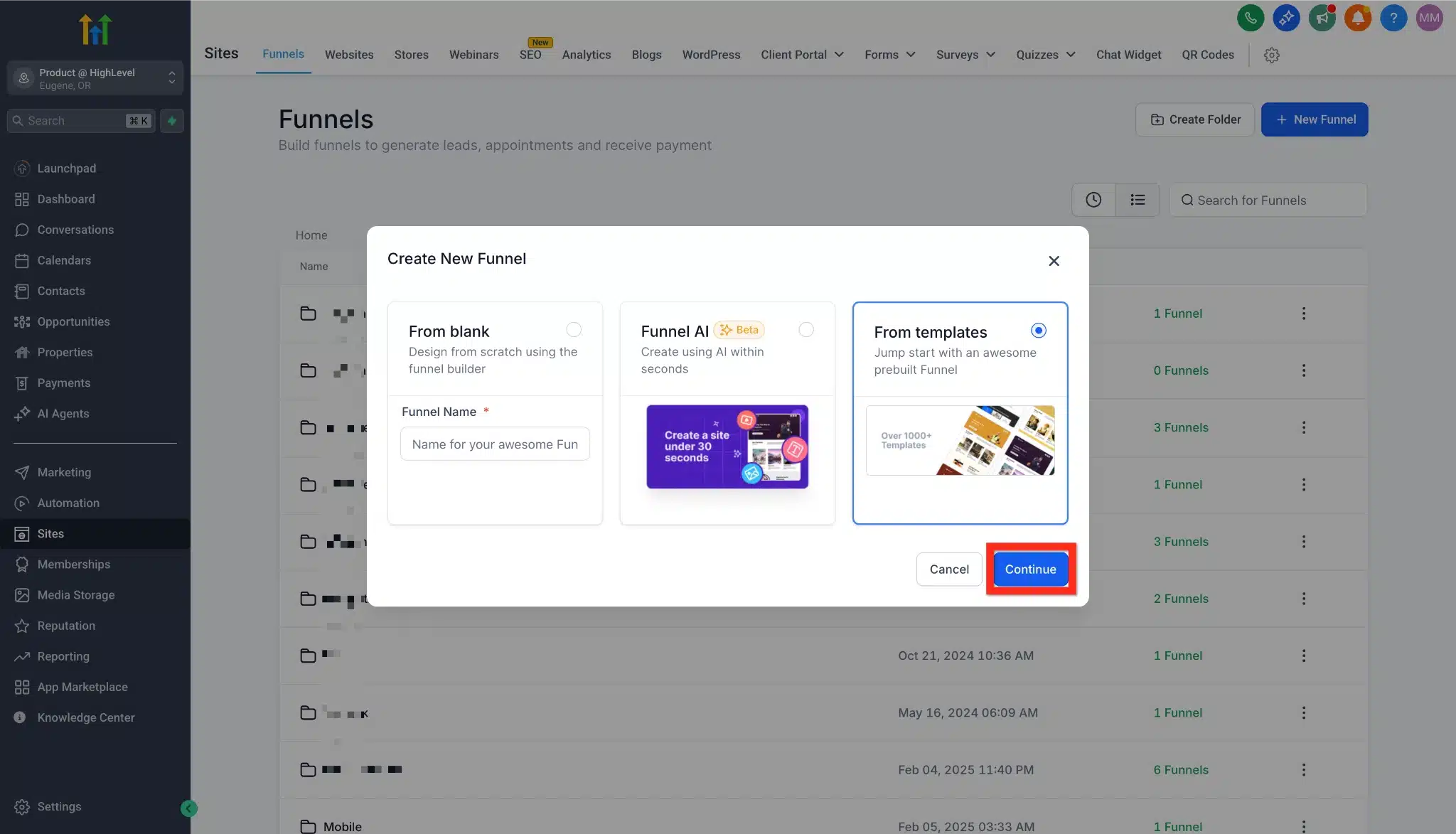
Navigate to your sub-account → Sites > Funnels > New Funnel. Name it: Client-Offer-Version (e.g., CoachingFunnel-LeadMagnet-v1). This keeps things organized.
Build the empty funnel container first. Define your steps upfront (landing page, opt-in, thank you page, etc.) before designing. This forces clarity and prevents page design confusion.
Step 3: Configure Custom Fields and CRM Tags Before Building Pages
This is where most GHL users get stuck. They design pages, then realize forms capture data in the wrong fields.
Configure your CRM first. Set up custom fields (Lead Source, Funnel Name, Lead Stage). Create your tag taxonomy. If someone opts in, tag them Funnel: Lead LeadMagnet. If they book a call, tag them as a hot lead. Then map your pipeline: where do opt-ins land? Where do booked calls move to?
This takes 30 minutes but saves weeks of debugging. Most agencies skip this.
Step 4: Build Your Funnel Pages Using the GHL Drag-and-Drop Editor
Understand the Box Model: Sections (green) hold Rows (blue). Rows hold columns (pink). Columns hold elements (orange). You can’t nest sections inside sections. This hierarchy controls mobile responsiveness. Most builders ignore this, and their funnels break on phones.
Now add your pages:
Landing Page: Headline, hero image, short copy explaining your solution, single CTA button.
Opt-in Form: Keep three fields simple: Name, Email, Phone (3 fields). Do not use third-party embeds; use GHL’s native form elements instead. Native forms integrate with your CRM in real-time and start workflows in real-time.
Thank You Page: Confirmation message, secondary CTA (watch video, schedule call), and social sharing buttons.
Step 5: Connect Your Form to Your CRM Pipeline and Set Up Two-Step Checkout (For Sales Funnels)
Click your form element → Settings > Form Settings. Link it to your CRM contact pipeline. Select which stage opt-ins land in (usually “Lead” or “New Prospect”).
When someone fills out your form, they automatically land in your CRM with populated custom fields and correct tags. Verify this works by submitting a test lead yourself.
For sales funnels: Use a two-step order form. Step 1 captures contact info and triggers abandonment recovery (if they bail, you still have their email and can send a recovery SMS or email). Step 2 handles billing. This strategy alone increases conversions by 15-20%.
Step 6: Build Your Automation Workflows
The pages are live. Now make them work 24/7.
Go to Automation > Workflows. Create a new workflow triggered by “Form Submitted” (select your specific form). Add your automation actions:
This runs the moment someone opts in. No manual work. Most conversions happen on touch 5–7, not touch 1. Automation ensures you hit all those touches.
Step 7: Connect Your Domain and Publish
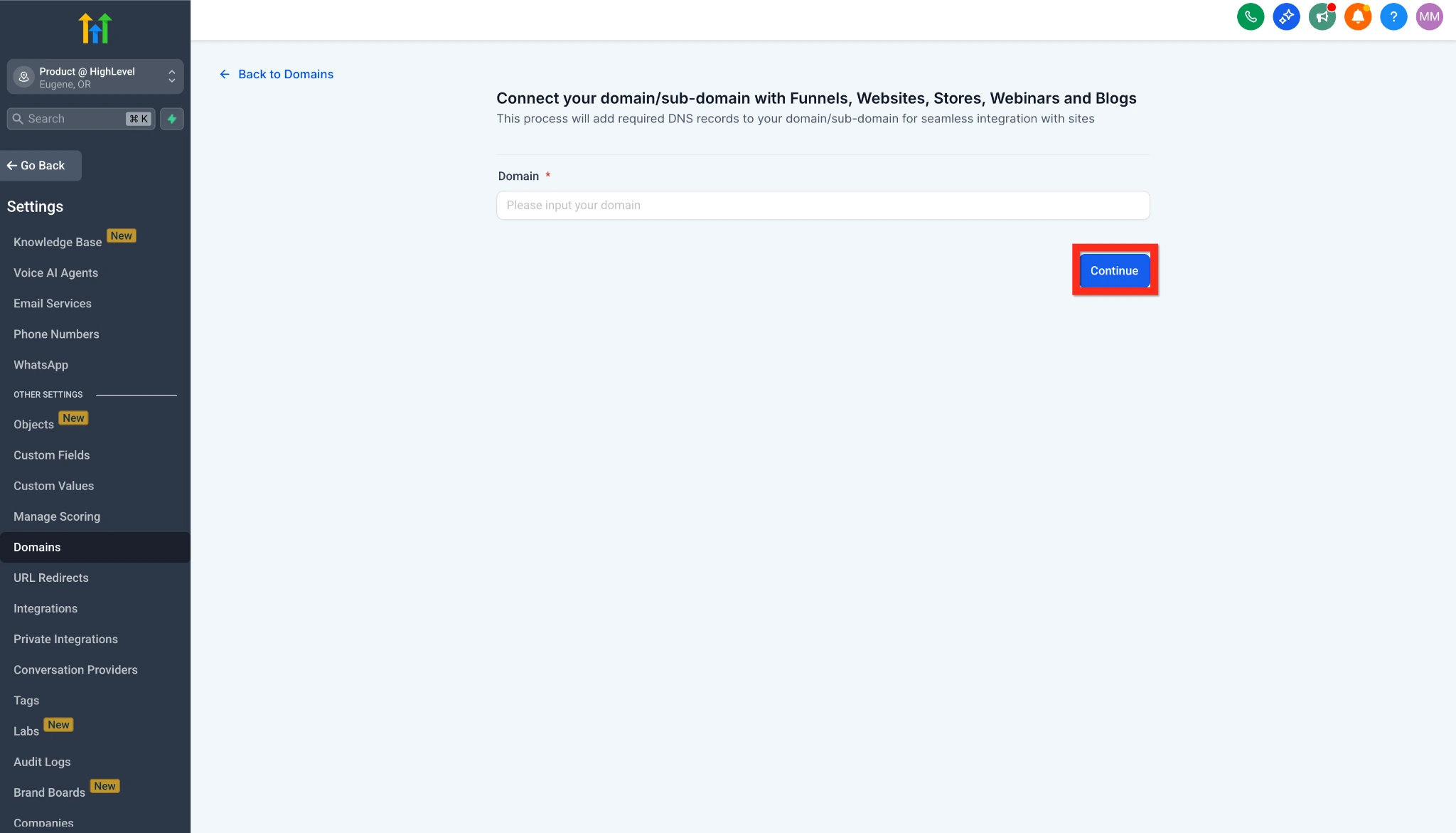
Go to Settings > Domains. Add your custom domain (or buy one through GHL’s domain store). Update your DNS records.
DNS setup: Use an A record for primary domains (Host: @, Value: 34.120.54.74) or a CNAME for subdomains (Host: www, Value: ghl.link). Cloudflare users: set proxy to “DNS Only” (gray cloud), or verification fails. GHL auto-issues SSL via Let’s Encrypt. DNS propagates in 1-24 hours.
Click Publish. Your funnel is live.
Step 8: Test, Track, and Optimize
Toggle Payment Mode to Test (if selling). Open your funnel in an incognito window. Fill the form. Verify the thank-you page loads. Check your CRM: Did the lead appear? Did the workflow fire? Did the email send?
Monitor metrics: page views, opt-in rate, click-through rate, and conversion rate. Use GHL’s Stats tab to find bottlenecks. If the opt-in rate is less than 5%, try out different headlines. Take advantage of GHL’s A/B test functionality: Make variations, divide traffic 50/50, and let the data decide the winner.
If you can get from 5% to 8% opt-in on 10,000 visitors, you’ll generate 300 additional leads each month.
Sales Funnel Types and How They Work in HighLevel
Each funnel type serves a different business goal. Understanding which type to build prevents wasted effort and mismatched page architecture.
Lead Magnet Funnel
Captures emails in exchange for free content (ebooks, checklists, training). Structure: landing page, opt-in form, thank-you page with download link. No payment processing needed. A lead magnet becomes your nurture entry point. Specific resources convert better than generic offers. “27 High-Ticket Coaching Niches” converts better than “Free Guide.”
Sales Funnel
Moves prospects from awareness to purchase. Includes landing page, sales copy, order form, and confirmation page. Most add order bumps and upsells. Every step removes friction. Two-step forms help reduce cart abandonment. The key metric is conversion rate, not just traffic.
Webinar Funnel
Webinar funnels register attendees, remind them before the event, and deliver content. They include a registration page, a confirmation with a countdown timer, a watch page, and a sales page after. Video builds trust faster than text. Follow-up emails convert best because attendees saw your full presentation.
Appointment Booking Funnel
This funnel qualifies prospects and books calendar time. It includes a landing page, a qualification form, a calendar widget, and a confirmation page. Works for high-ticket services where a phone call is next. Calendar syncs with the GHL calendar. Pre-qualification forms reduce no-shows.
Survey Funnel
Survey funnels segment prospects based on responses. GHL routes them to different pages based on answers. A fitness coach asks, “What’s your goal?” and shows weight-loss or muscle-building content accordingly. Survey funnels increase engagement through personalization and collect data about prospect challenges.
Membership Funnel
Membership funnels sell recurring access to communities or courses. They include a landing page, pricing page, checkout, and member login. The key metric is retention (members renewing), not just sales. Membership funnels require ongoing content delivery and automated welcome sequences.
Upsell and Downsell Funnel
Presents a higher-priced product after the initial purchase. A downsell is a lower-priced alternative if they decline. Structure: primary offer → one-click upsell → downsell if declined. Example: $47 course → $197 coaching upsell → $27 template downsell. This sequence increases AOV by capturing different price points.
The Order Sequence: Bumps to Upsells to Downsells
Stack offers to increase the average transaction value.
Order Bumps:
Checkbox on checkout form. The visitor adds with one click. Example: Course + template pack for $27. Converts 15-30% due to minimal friction.
One-Click Upsells (OTO):
New page after purchase. Charge card on file instantly. Example: Course → $197 coaching upsell. Works because they already made a buying decision.
Downsells:
Fallback if they decline the upsell. Lower price, simpler offer. Example: Decline coaching → $47 template offer. Recovers lost revenue.
Structure: Primary sale → OTO → Downsell. Can double AOV by capturing different budgets.
AI-Powered Sales Funnel Generation in HighLevel
Use GHL’s Funnels & Websites AI to cut build time to 30 minutes.
Assist Mode:
Enter industry, goal, audience, and brand tone. AI generates a complete funnel with layout, copy, and SEO suggestions in 5 minutes.
Build Mode:
Use custom prompts like “Create a three-page therapist funnel with a before-and-after gallery.” AI builds structure with placeholder content you customize.
URL Import:
Point AI at a competitor’s funnel. It extracts visual themes to match your brand and refines copy in real-time.
This cuts build time from 4 hours to 30 minutes.
Read this: How to Use Niche Funnels to Dominate Local Lead Generation.
Common HighLevel Funnel Mistakes
Building without a buyer journey: Pages don’t flow. Leads get confused. Build the journey first, pages second.
Configuring CRM after building pages: Forms capture into the wrong fields. Automation doesn’t trigger. Funnel broken in production. Configure CRM before touching the editor.
Using third-party forms: Zapier delays. External embeds don’t trigger workflows instantly. Use native GHL forms. They’re built for this.
Not setting up automation: Pages go live, but nothing happens. No emails. No SMS. Dead leads. Automation converts. Set it up immediately.
Skipping A/B testing: Launch once and assume it’s final. Test headlines, CTAs, and images. Let data guide you, not guesses.
Ignoring Core Web Vitals: Google ranks funnels by page speed. Keep above-the-fold images under 200kb. Move heavy third-party scripts (maps, chat widgets) below the fold. Enable “Optimize JavaScript” in site settings to reduce total blocking time. This improves search rankings.
Deploy Funnels Across Multiple Clients
Use Snapshots. Package your configured sub-account (funnels, workflows, pipelines, custom fields) as a template. Deploy to new clients in 30 seconds instead of 4 hours.
Use Universal Sections (sync changes across funnels) or Section Templates (static starting points). Keeps design consistent and speeds builds. Most agencies that scale do this from day one.
Real Example: A Lead Magnet Funnel Built in HighLevel
Funnel Name: Coach-LeadMagnet-v1
Landing Page
Headline: “Get 27 High-Ticket Coaching Niches (Free List)” – Image: Coach with successful client – Copy: Why high-ticket coaching works and what they’ll learn – CTA: “Send Me the List”
Opt-in Form
Fields: First Name, Email, Phone – Links to CRM pipeline: “New Lead” stage – Auto-tags: Funnel-LeadMagnet, Nurture
Thank You Page
Message: “Check your email. Your list is on the way.” – Bonus CTA: “Watch my free 5-minute funnel training” – Social sharing: Share this on Facebook
Automation
Email 1 (immediate): The promised list and welcome email. Email 2 (day 3): “3 Mistakes Coaches Make When Pricing High-Ticket” – Email 3 (day 5): Client case study (went from $97 course to $5K per month coaching) – Email 4 (day 7): Webinar invitation – SMS (day 2): “Did you get the list? Reply YES if you want personalized advice
This funnel runs automatically. Every new lead gets this exact sequence. No manual follow-up.
FAQs
How long does it take to build a funnel in HighLevel?
A simple lead capture funnel takes 2–3 hours. A sales funnel with upsells takes 4–6 hours. Using templates or AI cuts these times in half. Speed depends on how much you customize versus using defaults.
Do I need to know code to build a funnel in HighLevel?
No. GHL’s drag-and-drop editor handles everything. If you can use Google Docs, you can build a GHL funnel. Most builders never touch code.
Can I use HighLevel funnels for appointment booking?
Yes. Add a GHL Calendar widget to your funnel step. Prospects see your availability and book directly. Calendar syncs with your GHL calendar. No double-booking because the system removes booked slots automatically.
What payment gateways does HighLevel support?
Stripe, PayPal, and Authorize.net. Connect them in Settings > Integrations. Add an Order Form element to your sales page. Orders are processed instantly and trigger automation immediately.
How do I split-test a funnel in HighLevel?
Click the funnel step and select Create A/B Test. Edit variation by changing headline, CTA, or image. GHL splits traffic 50/50 and tracks performance automatically.
Conclusion
Building a high-converting funnel in HighLevel isn’t about templates or design. It’s about configuring your sub-account correctly, mapping your buyer journey first, and tying every page to automation.
Most GHL users have beautiful funnels that don’t convert because the CRM, custom fields, and workflows are misconfigured. Fix your strategy, then your pages, then your automation. Do it in this order, and your funnel will turn visitors into leads and leads into customers 24/7, with no manual work.